Workflows
A workflow chains a trigger (a keyword, a shortcut, Universal Actions, a
command) to actions and outputs: type issue 14 and open issue 14,
select text in any app and tidy it up, run your own script and show its result.
You build workflows as boxes and connectors in Settings → Workflows, or write
the small workflow.toml file yourself.
- Try one in two minutes
- The builder
- Triggers
- Nodes
- Placeholders, the argument and variables
- How a run works
- Permission, privacy and limits
- The gallery
- The file format
- Coming from Alfred
- Troubleshooting
Try one in two minutes
- Open Settings → Workflows and press New from template…, then Use this next to Open a URL with the query. The builder opens it.
- Press Save (
Ctrl+S). The template runs no code, so Sevak does not ask for permission. - Open Sevak and type
issue 14, thenissue dark mode. The first opens issue 14 in your browser; the second searches the issues.
In the builder you can see why: the Conditional box looks at what you typed and follows its then connector for a number and its else connector for anything else.
The builder
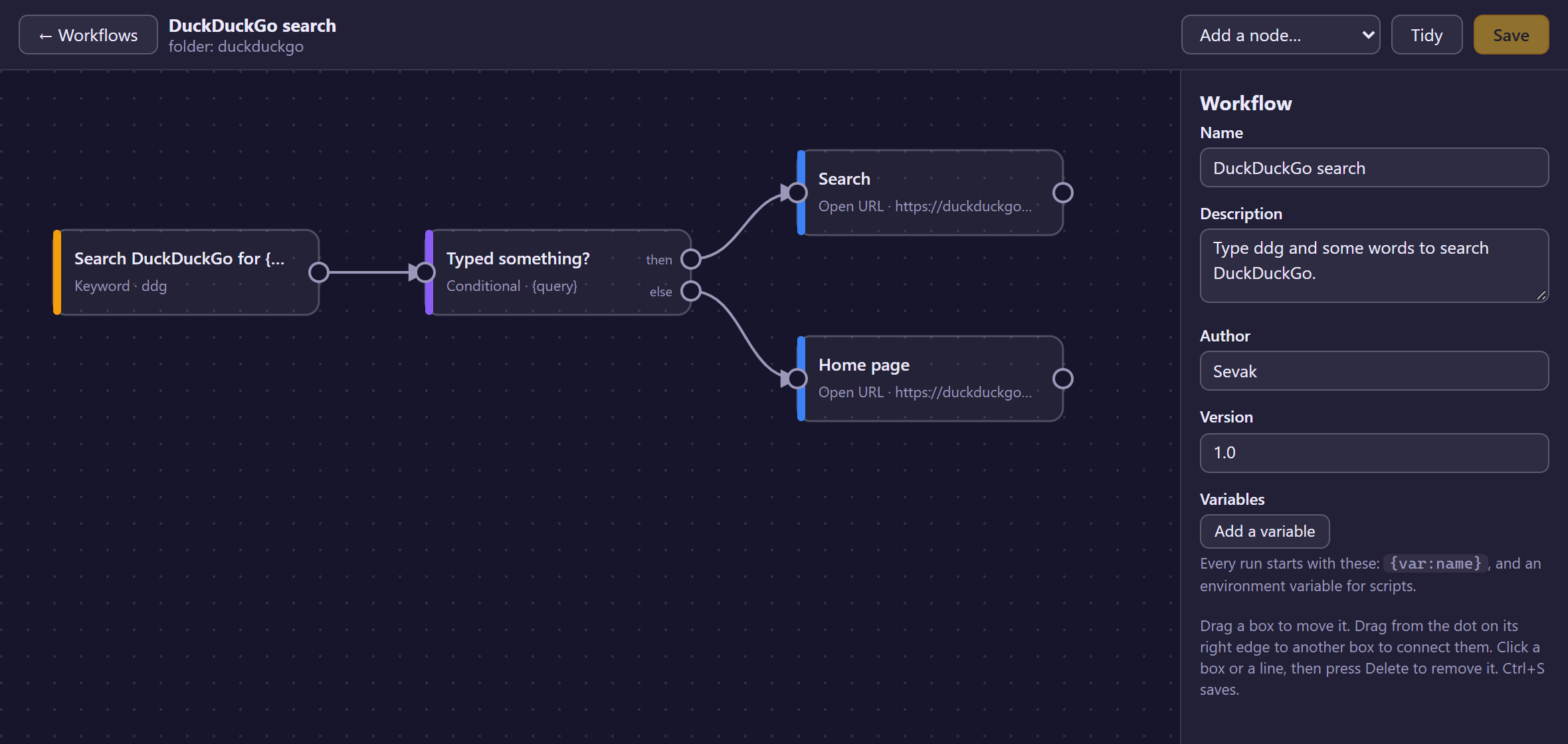
Settings → Workflows lists every workflow, with a switch to turn each on or off, Edit, Delete, and Review… for one that waits for your permission. New workflow starts a blank one; New from template… offers three starting points (search a site, open a URL with the query, a script filter).
In the builder:
| To | Do |
|---|---|
| Add a node | Pick it from Add a node…; it appears at the top-left of what you see |
| Move a node | Drag its box (or focus it and use the arrow keys; Shift moves further) |
| Connect | Drag from the dot on the right edge of a box to another box. A conditional has two dots, then and else |
| Connect without a mouse | Select the node and use Connect to… in the side panel |
| Edit a node | Click it; its settings are in the side panel |
| Delete a node or a connection | Select it and press Delete |
| Arrange the boxes | Tidy |
| Save | Save or Ctrl+S |
The builder refuses connections that cannot be right (to a trigger, to the same node, or one that would make a loop), and the Problems list under the side panel shows what else is wrong; a node with a red dot has an error, a yellow dot a warning. Save is only available when there are no errors. Warnings, such as a node nothing leads to, do not stop you.
Saving rewrites workflow.toml in the builder's own layout, so comments and
formatting you added by hand are not kept. The builder never touches the scripts
and other files in the folder.
Triggers
Every workflow starts at one or more triggers. A workflow may have several.
| Trigger | Starts when | Argument |
|---|---|---|
| Keyword | you type the keyword (docs rust) and press Enter on its result |
the text after the keyword |
| Script filter | you type its keyword and pick a row of the results its script printed | the row's arg |
| Hotkey | you press a global shortcut | empty |
| Universal Actions | you select text, a link or files, press Ctrl+Alt+Space and pick the workflow |
the selection |
| External trigger | sevak --trigger <folder>/<node id> [text] runs |
the text after it |
Keyword. argument says whether text must follow: optional (the default),
required (the result says "Type some text after the keyword" and does nothing
until you do) or none. The label of the node is the result's title and may use
{query}. Pressing Tab on the bare keyword completes it to keyword.
Keyword clashes. A keyword that is already used by a built-in search, a web search engine, a script plugin or another workflow (compared without regard to case) is only a warning, so the workflow still runs and both sets of results are shown. The warning names the other owner (for example Keyword "g" is also used by web search Google; both will show results.) and appears next to the node in the builder, on the Workflows page and in the log. Give the keyword another name to silence it.
Hotkey. The key uses the same syntax as the shortcut settings
(Ctrl+Alt+K). Sevak registers it like a [[hotkey]] entry in config.toml
(without writing it to that file), so it needs a system that lets Sevak grab
keys: Windows, macOS and Linux with X11. On Wayland use an external trigger
and bind a key to the command in your desktop's settings. Registration problems,
such as a key another app owns, show on the workflow's row. The id of the result
the key runs is workflow:<folder>:run:<node id>, so
sevak --run workflow:my-flow:run:key does the same from a script.
Universal Actions. The node's Offer it for choice picks the kinds of
selection that show the workflow in the actions list: Text (any text,
including a link), Links (a selection that is only links) and Files and
folders. The selection becomes the argument, one link or path per line when
there are several; the variable selection_kind is text, url or file. See
Universal Actions for how Sevak reads the
selection.
External trigger. For anything that can run a command: a desktop shortcut on Wayland, a script, a file manager action, a scheduled task.
sevak --trigger my-flow/go                 # no text
sevak --trigger my-flow/go some text       # several words are one text
sevak --trigger my-flow/go -- --starts-with-dashes
my-flow is the workflow's folder name and go the id of the external trigger
node (shown under Id in the builder). Sevak must be allowed to run the
workflow, enabled, and valid; otherwise the launcher opens and says why.
Nodes
Actions
| Node | Does | Notes |
|---|---|---|
| Run script | runs a program; what it prints becomes the argument | details below |
| Open URL | opens a web or mail link | only http, https and mailto; placeholders are URL-encoded; the address must be well formed (a host, no user name or password in it, no control characters or quotes, at most 8192 bytes; a mailto: link only recipients, subject and body) |
| Open file | opens a file or folder with its default program | ~ is your home folder; a relative path is inside the workflow's folder; a program or script opens by running, so needs permission |
| Launch app | starts an application by name (as in the launcher) or by path | runs code, so needs permission |
| System command | lock, sleep, hibernate, restart, shutdown, logout, empty_trash |
needs permission; the destructive ones ask each time |
| Terminal command | opens your terminal and runs a command line | needs permission; see quoting |
| Copy | puts text on the clipboard | |
| Paste | pastes text into the app you were using | copies instead where pasting is unavailable; types into another app, so needs permission |
Run script
Give either a program and arguments (one per line, the program first) or a
script file in the workflow's folder, which Sevak starts the way it starts
script plugins (.py with Python, .ps1 with PowerShell, .js with Node, .sh
with sh, anything else as an executable). No shell is involved: every
argument is passed as it is, so {query} in an argument cannot run commands, no
matter what it contains.
- The script runs in the workflow's folder.
- More arguments and Standard input may use placeholders.
- Its variables arrive as environment variables, as do
SEVAK_QUERY(the argument, if under 16 kB),SEVAK_WORKFLOW_ID,SEVAK_WORKFLOW_DIR,SEVAK_WORKFLOW_DATA(a folder for the script's own files),SEVAK_VERSION, and the names Alfred workflows read (alfred_workflow_*). A script does not inherit Sevak's whole environment: it getsPATH, the home and temp folders, the locale, theXDG_*folders, the display variables and what Windows programs need to start, nothing else (tokens and credentials in Sevak's environment stay out of reach). Variables that change how programs start or where they look (PATH,HOME,TMPDIR,BASH_ENV,PYTHON*,NODE_*,PERL5*,RUBY*,JAVA_*,LD_*,DYLD_*,GIT_*,DOTNET_*, proxy and certificate variables,XDG_*,SEVAK_*and a few more, in any letter case) are never exported from workflow variables, and a node's own Environment variables may not name them: the builder reports an error and the workflow does not load until it is removed. Other names are passed. - What it prints (standard output, up to 1 MiB, minus the final newline) becomes
the argument of the next nodes. If it prints Alfred's envelope
{"alfredworkflow": {"arg": "...", "variables": {"name": "value"}}}, the argument and the variables are set from it. - It is stopped after its timeout (10 seconds unless you set another, up to 5 minutes). A non-zero exit ends the branch with "exited with code N".
- Its error output is discarded, because it may hold your data. Tick Log its error output while debugging to write its first 500 characters to Sevak's log.
Utilities
| Node | Does |
|---|---|
| Set variable | name = value (placeholders allowed) for the nodes after it |
| Transform | changes the argument, or stores the result in a variable (Store in variable): set, UPPER, lower, Title Case, trim, URL-encode/decode, Base64 encode/decode, replace text, replace with a regular expression ($1 is a group), first line, split at some text and keep part n |
| Conditional | continues along then when the test holds, else otherwise: equals, does not equal, contains, does not contain, starts with, ends with, matches a regular expression, is empty, is not empty (optionally ignoring case) |
| Delay | waits up to 60 seconds |
Regular expressions are Rust's regex syntax: linear
time, no look-around, and limited in size, so a pattern cannot hang Sevak.
Outputs
| Node | Shows |
|---|---|
| Notification | a system notification (heading defaults to the workflow's name) |
| Large Type | the text huge on screen (dismiss with any key or a click) |
| Text view | the text in the launcher window, below the search bar |
Script filter
A script filter is both a trigger and an input: it has its own keyword, runs a
script whenever the text after the keyword changes (the text is the last
argument), and shows the rows the script prints as results. Picking a row starts
the nodes after it with the row's arg as the argument and its variables as
variables. It speaks Alfred's Script Filter JSON;
the same rules as script plugins
apply (a late script never blocks typing, results are cached for a moment, etc.),
plus:
| Item field | In a workflow |
|---|---|
arg |
the argument of the next nodes (the first string of an array) |
variables |
variables for the next nodes (text, numbers and booleans) |
valid: false |
the row only informs; Enter does nothing |
autocomplete |
what Tab types (after the keyword) |
mods |
secondary actions: cmd is Ctrl+Enter (⌘↵ on macOS), alt is Alt+Enter, shift is Shift+Enter; ctrl, fn and combinations are in the action panel (→ or Ctrl+K). A mod's own arg and variables replace the row's, and the variable mod tells the next nodes which one was picked (alt, cmd+alt, ...) |
uid, title, subtitle, icon.path |
as in script plugins |
Use a Conditional on {var:mod} to treat an alt pick differently.
The script filter uses the workflow's variables as environment variables (and
SEVAK_WORKFLOW_*), and stops a run after Stop the script after (3 seconds by
default). A script filter that gives both a script and extra arguments looks
for its interpreter when the workflow loads, so choose Reload index after
installing Python or Node.
Placeholders, the argument and variables
Text fields of nodes can use placeholders:
| Write | Becomes |
|---|---|
{query} |
the argument that reached the node |
{var:name} |
the variable name (empty when it was never set) |
{query\|upper} |
filters, left to right |
Filters: url (percent-encode), raw (insert as it is: no encoding in a link,
no quoting in a command line), upper, lower, title, trim, json (escape
for a JSON string), sh (quote as one POSIX shell word) and ps (quote as one
PowerShell string). Other text in braces, such as JSON or ${HOME}, is left
alone.
- In Open URL, every placeholder is percent-encoded, so
https://example.com/?q={query}is safe for any text. A variable that holds a whole address needs|raw:{var:site|raw}/search?q={query}. - In Terminal command, every placeholder is quoted as one literal word for
the shell that runs the line (the one
[shell]picks: single quotes forsh,bash,zshand the macOS login shell, PowerShell single quotes forpwshandpowershell, double quotes forcmd). Sogrep {query} notes.txtsearches for the whole argument even if it isx; rm -rf ~, and nothing in it runs.cmdcannot quote",%,!or a line break: an argument with one of them makes the node fail with an error rather than run. To put text into the command line as commands, opt out with|raw(git {query|raw}), and only for text you trust.|shand|psstill pick a quoting style by hand. Run script passes arguments without any shell and needs none of this. - Expanded text is capped at 4 MiB.
The argument starts as the trigger's text. Run script replaces it with
what the script prints; Transform replaces it (or stores into a variable);
every other node passes it on. Variables start from the workflow's own
[variables] (edit them in the builder with nothing selected) and the
trigger's (a script filter row's), and nodes can add more.
How a run works
- A node with several connections runs them one after the other in the order they appear in the file (the order you connected them), each with its own copy of the argument and variables. So a workflow always does the same things in the same order.
- A node that fails (a script that exits with an error or times out, a link that cannot open) ends its branch only; the other branches carry on. Sevak shows a notification naming the node and what happened.
- Everything runs on a thread of its own, never in the launcher or while you type. The launcher hides before a workflow starts, so a Paste node returns to the app you were using.
- Limits: at most 200 steps per run (a node on two branches counts twice), 15 minutes in total, 8 workflows at once. Reload index, saving settings or quitting stops workflows that are still running.
- The log names the workflow and the node ids (
workflow finished,node failedand the kind of node), never what you typed, selected or copied, and never a program's output.
Permission, privacy and limits
Permission. A workflow whose nodes can run code or commands (Run script,
Script filter, Launch app, System command, Terminal command,
Open file, because opening a program or script runs it) or type into other
apps (Paste) does nothing until you allow it. Sevak shows a dialog with the
workflow's name, what starts it, whether it will receive your Universal Actions
selection, every command with its arguments, the names of the environment
variables a script node sets, whether it sends text to a program's standard
input, and "also does:" lines for every node that pastes text or opens a
file or link. It closes with the folder's name and a short contents id. Text
written by the workflow's author is shown with control and direction-changing
characters removed and long text cut, so it cannot fake extra lines or hide
what runs. Sevak remembers your answer in script-plugin-approvals.json (the
file script plugins use). Not now asks again at the next start; the
workflow's row has Review… if you change your mind.
What you allow is what can run: the settings of those nodes, the connections, the workflow's variables and the contents of the script files they name. If any of that changes (an edit in the builder, or a script file changed on disk), Sevak asks again after the next reload. Moving boxes, renaming and retitling do not. A workflow that only opens links, copies and shows text runs without asking, because it can do no more than the actions in the launcher can; it still never runs anything you did not trigger. A Paste node does ask: it types into whatever app was in front, which is as good as you typing it, so a workflow that pastes needs your yes too (workflows you had with a Paste node ask once after upgrading). A file that an Open file node names inside the workflow's folder is part of what you allow, like a script.
Two caveats. A script may read other files the workflow folder refers to (a module it imports) without Sevak noticing a change in them: install workflows you trust. And workflows are not sandboxed: a script has your account's permissions.
Privacy. Workflows never send anything anywhere on their own. What a script
does on the network is up to the script. The Universal Actions selection reaches
a workflow only when you pick it, lives in memory, is not in result ids, and does
not touch the usage history or search history (workflows triggered by Universal
Actions, hotkeys and --trigger record nothing there; keyword results are
recorded like any result).
The gallery
Settings → Gallery lists ready-made workflows and script plugins. It is opt-in and on request:
- Opening the page requests nothing. Load gallery downloads one small file,
gallery/index.jsonfrom the Sevak repository on GitHub (raw.githubusercontent.com) at the tag of your Sevak version, and shows what it lists. A change made to the repository later does not change what your version offers. A build without a published release (a local or pre-release build) reads the latest release's list and says so on the page. Files are requested only from Sevak's own repository, also when a request is redirected; see Gallery trust. - Install on an entry downloads that one package, a zip, over HTTPS, checks it against the SHA-256 in the index and discards it if it does not match, refuses any path that would leave the folder (and links, oversized or too-many files), checks that the workflow or plugin inside is valid and unpacks it into the workflows or plugins folder. An existing folder is never overwritten.
- The new folder is not allowed yet: Sevak shows its usual permission dialog before anything in it runs.
What the gallery offers
Ten workflows and six script plugins ship in the gallery, all written by the Sevak project and described in gallery/README.md:
| Workflow | Does | Runs code? |
|---|---|---|
| DuckDuckGo search | ddg words |
no |
| Developer search | so, mdn, crate, docsrs, npm, pypi open that site's search |
no |
| GitHub search | ghr repositories, ghi issues and pull requests, ghu people |
no |
| Wikipedia search | wiki words; change the lang variable for another language |
no |
| Maps search | map place (OpenStreetMap), gmap place (Google Maps) |
no |
| Open selection as a link | Universal Actions: opens a selected web address; javascript:, file: and non-addresses are refused |
no |
| Tidy up whitespace | Universal Actions: collapses spaces and line breaks and pastes the result | no |
| Markdown helpers | Universal Actions: Markdown link, bold, code, quote, bullet list | no |
| Decode and encode | Universal Actions: Base64 and URL decoding in a text view, encoding to the clipboard | no |
| Selection toolkit | Universal Actions: word count (Large Type), JSON pretty-print and minify, timestamp and date | a short Python 3 script, after you allow it |
Tidy up whitespace and Markdown helpers run no code but paste into the app you came from, so (like any workflow with a Paste node) they ask for your permission once after you install them.
The plugins are the case converter (Node.js) and Python 3 plugins for passwords
(pw), IDs (id: UUID v4/v7, ULID, NanoID), colors (color), placeholder text
(lorem) and checksums (hash). The search workflows only open your browser at
the site named in the workflow; none of the gallery's content makes a network
request itself. Packages are small and readable on purpose, and the repository's
tests run every workflow and script against sample input.
Each request sends only what any web request does (your address, and a user
agent Sevak/<version> (gallery)). Nothing else leaves your computer, and Sevak
keeps no account or identifier. The bundled examples are in
examples/ and their zips in gallery/packages/.
The newer Settings → Extensions page and the ext keyword use the same
lists and the same checks, and add updates, removal and native extensions
(programs written in Rust); see Extensions.
To offer your own package: pack the folder (cargo run -p sevak-plugins --example
gallery_pack -- <folder> <out.zip> prints the SHA-256), add an entry to
gallery/index.json (its source is the path of the zip relative to the
repository root, gallery/packages/<id>.zip; node scripts/gallery-check.mjs
--update fills in the hashes and checks the rest) and open a pull request. The
rules a package has to meet and a pre-merge checklist are in
gallery/README.md; see also
plugins.md.
The file format
A workflow is the folder <config folder>/workflows/<name>/ with workflow.toml
(and scripts) in it. The config folder is next to config.toml:
%APPDATA%\sevak on Windows, ~/Library/Application Support/sevak on macOS,
~/.config/sevak on Linux. Folders starting with . are ignored.
format = 1                      # the file format version
name = "Search docs"
description = "docs rust opens the Rust docs search."
author = "you"
version = "1.0"
enabled = true                  # false keeps it installed but off

[variables]                     # start-of-run variables (also environment variables for scripts)
site = "https://doc.rust-lang.org"

[[node]]
id = "kw"                       # unique; 1-40 letters, digits, - and _
type = "keyword"
title = "Search the docs for {query}"
x = 40                          # canvas position; layout only
y = 80
keyword = "docs"
argument = "required"           # none | optional | required

[[node]]
id = "open"
type = "open_url"
url = "{var:site|raw}/std/?search={query}"

[[connection]]
from = "kw"
to = "open"                     # port = "then" / "else" after a conditional
Node types and their fields: keyword (keyword, argument, subtitle),
hotkey (key), selection (accepts), external, script_filter
(keyword, command or script, args, timeout_ms, hard_timeout_ms),
run_script (command or script, args, stdin, env, timeout_ms,
log_stderr), open_url (url), open_file (path), launch_app (app,
args), system_command (command), terminal_command (command), copy
(text), paste (text, restore_clipboard), set_variable (name,
value), transform (op, input, find, replace, index, into),
conditional (left, test, right, ignore_case), delay (ms),
notification (heading, body), large_type (text) and text_view
(heading, text). Every node may also have title, x and y. Unknown
type values make the whole workflow fail to load ("Not loaded: ..." on its row)
rather than half-work. The examples in
examples/workflows/ show real files.
To disable every workflow, use [plugins] disabled = ["workflow"] in
config.toml; the switch on a workflow's row (its enabled field) turns off
one. workflow:<folder> also works in that list.
Coming from Alfred
Workflows borrow Alfred's ideas, not its file format: there is no importer for
.alfredworkflow packages, and Sevak's nodes are fewer. Script Filter scripts
and {query}/{var:name} placeholders work as in Alfred, and Alfred's
alfredworkflow envelope and alfred_workflow_* environment variables are
understood. Differences worth knowing:
- Nodes run in a fixed order, one branch after the other; Alfred runs branches in parallel.
- Scripts are never run through a shell: use
commandorscriptwithargs.{query}is substituted into arguments, not into a script's source. - Modifier keys: Alfred's
cmdis Sevak'sCtrl(Command on macOS). - Anything that runs code needs your permission first, and the permission is tied to what runs.
Trademark
Alfred is a trademark of Running with Crayons Ltd. Sevak is not affiliated with or endorsed by it; the name is used only to describe the file format and conventions Sevak reads.
Troubleshooting
| Symptom | Likely cause |
|---|---|
| The workflow's row says Waiting for your permission | It runs code. Press Review… (or choose Reload index in the tray) |
| The row says Not loaded | The file has an error; the message says which. Fix… opens it in the builder |
| The keyword shows nothing | The workflow is switched off or waiting for permission; another plugin may also answer the keyword (both answer; the Workflows page and the builder warn about this) |
| A hotkey does nothing | The row shows "The shortcut ... is not active" if another app owns it; on Wayland use an external trigger |
| A script node fails at once | The interpreter is not installed (the notification says "none of ... is on PATH"), or the path is wrong. Tick Log its error output and look at Reveal logs folder |
| Paste only copied | The system cannot paste (Wayland, or macOS without Accessibility permission); the text is on the clipboard |
sevak --trigger opens the launcher with a message |
The workflow or node does not exist, is off, or is not allowed yet |